
Color: green, Ships From: CHINA - Universal 10.26" Portable Carplay Car Screen Wireless Carplay Scr F640-12000042238255656

- Maximum Purchase:
- 47 units
- Shipping:
- Calculated at Checkout




Description
Origin: Mainland China
Din: Double Din
Display Size: 10.26" inch
OSD Language: Chinese (Simplified)
OSD Language: Chinese (Traditional)
OSD Language: Arabic
OSD Language: POLISH
OSD Language: Russian
OSD Language: FRENCH
OSD Language: KOREAN
OSD Language: DUTCH
OSD Language: Portuguese
OSD Language: HEBREW
OSD Language: Spanish
OSD Language: Italian
OSD Language: English
Max External Memory: 256G
Digital Media Format: CD
Is touch screen: YES
Special Feature: Built-In Speaker/Microphone
Special Feature: wifi function
Certification: CE
Special Features: Voice Control
Warranty: 365 days
Built-in Screen: YES
Item Size: 10.26 inch
Operating System: Linux
Item Weight: 0.8
Voltage: 12V
Display size: 10.26 inches touch screen
T322: 4K 3840*2160 Front camera
T333: No front camera
Latest Features: Carplay and Android Auto
Function 1: Voice Control
Function 2: GPS track playback
Function 3: FM Connection
Feature 1: Video recorders(Exclude T333 model)
Feature 2: Rear view camera(optional)
Feature 4: Mirror recorder(optional)
Feature 6: Rear view camera(optional)
Feature 7: Reverse camera(optional)
Feature 8: Rear view mirror(optional)
Feature 9: Car dvr(Exclude T333 model)
Feature 10: dash cam front and rear(Exclude T333 model)
Choice: yes
semi_Choice: yes
ote :
T322 With 4K 3840*2160 Front camera
T333 No front camera
【Easy Installation】 The portable CarPlay Screen comes with self-adhesive brackets for secure dashboard placement, which can be easily removed when not in use. Working environment 12V 3A, it's suitable for cars, vans, trailers, campers, trucks, and caravans.
【Universal Compatibility】 Our CarPlay Screen is compatible with all vehicles. With this device, you can enjoy features like YouTube, podcasts, messages, Google Maps, navigation, Spotify, Apple Music, and Bluetooth calling, making it the ultimate hands-free device. It fits seamlessly into cars, SUVs, trucks, RVs, vans, and buses, working harmoniously with your car's existing radio system.
【Comprehensive Functionality】 This all-in-one CarPlay screen integrates car video recording, reversing assistance, and both Apple CarPlay and Android Auto compatibility. It offers a range of features designed for entertainment, navigation, video recording, and safety. With voice control and hands-free operation, you can keep your focus on the road and avoid fines or tickets, enhancing your overall driving experience.
【Dual Camera System】Equipped with front and rear dual cameras(Optional), it delivers crystal-clear images, allowing you to capture crucial details like license plates in case of an incident. A 64GB TF Card is included for some models to store videos from both cameras, safeguarding your rights and interests.
【Enhanced Reversing Safety】The CarPlay system's backup camera boasts a 170-degree ultra-wide angle, covering approximately 6 lanes of road. This extensive view makes parking and reversing much safer and easier, providing a clear view of your surroundings.
【10.26 Inch 1080P Full HD Screen】 Our product boasts a large 10.26-inch 1080P full HD touch screen. With improved sensitivity, a clearer display, and vibrant colors, this upgraded screen significantly enhances the user experience.
【AUX / FM Transmission Options】 The portable CarPlay screen includes built-in speakers. For enhanced sound, you can transmit audio to your car speakers using either FM frequency syncing or the included AUX cable connected to your car's AUX input jack.


The front camera can rotate 360 °, and can record both inside and outside the car as well as the passenger seat
Both front camera 4K and rear camera 1080P support video recording
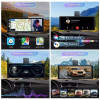
Supports wireless and wired Carplay
Supports both wireless and wired Android Auto
Support screen mirroring for Apple and Android phones

Support Carplay screen switching suitable for left peptide and right peptide vehicle models

Support switching between 4 screen display modes
Supports Siri and Google Voice in Carplay mode
Supports multiple sound playback formats: FM+speaker+Bluetooth+AUX
Supports the vast majority of GPS navigation map software in Carplay mode GPS connection method: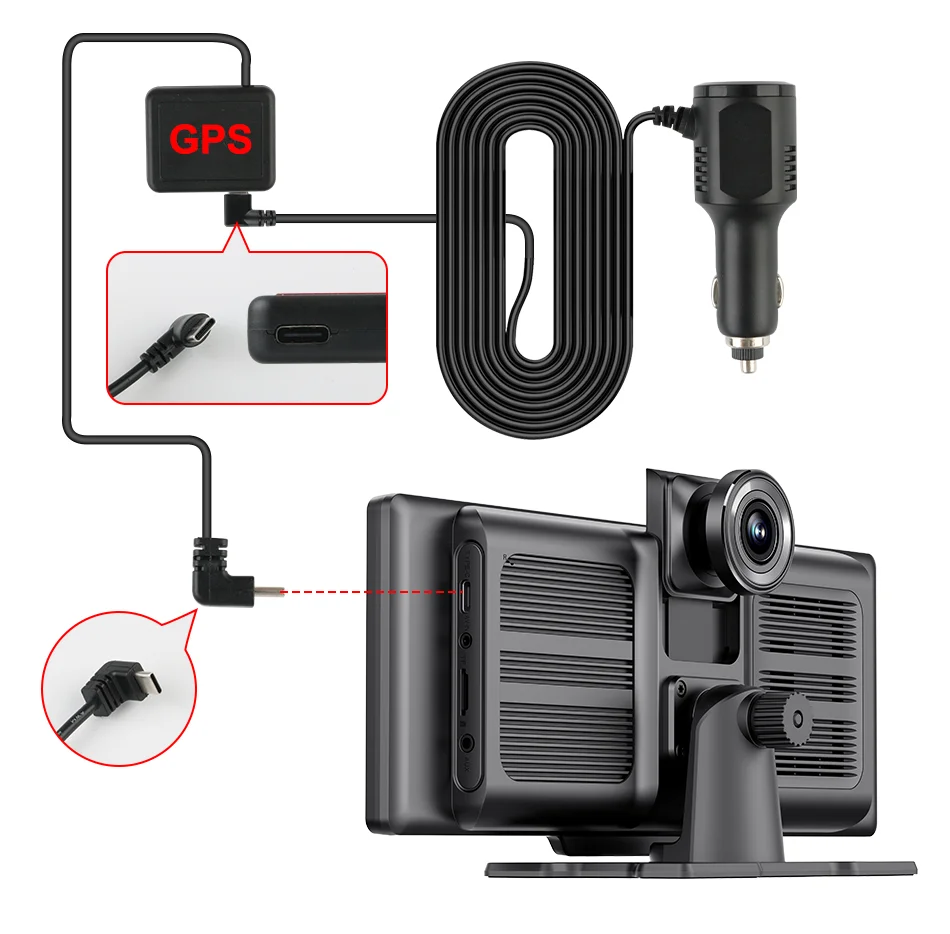
Purchase the rear camera version to support real-time reverse monitoring


The connection and installation are very simple


T322 model


T333 model


FAQ:
Q:How to connect the CarPlay / Android Auto?
A:Open phone's WiFi first, then open phone's Bluetooth to pair and connect.
Q:How to reconnect the device if manually disconnected from CarPlay / Android Auto?
A:Open your phone's Bluetooth settings to reconnect the device.
Q:How to turn on the camera recorder?
A: After inserting the TF card, the system will enter the recording mode.
Q:How to select the audio output?
A:Enter the Audio page, select DVR Speaker, or select FM/AUX/Bluetooth to connect the car stereo.
Q:How to display the screen in split-screen?
A:Click "Setting" in the main interface, then click "CarPlay position" to set split screen.
Q:How to adjust the Fm radio volume?
A:If you connect the car stereo, can adjust the volume through the car volume button.
Related Products
Related Products


Color: Red, Ships From: CHINA - Universal 10.26" Portable Carplay Car Screen Wireless Carplay Scree F640-12000042238255653


Color: green, Ships From: CHINA, Bundle: Official Standard - Original HONOR Magic6 Pro smartphone a F640-12000043166616263


Color: green, Ships From: CHINA - Lawaia 30L Outdoor Sport Camping Hunting Backpack Tactical Trekki F640-12000032646000536

